Implementing Scalable GitOps With Argo CD and ApplicationSets: A Case Study
This infrastructure was developed at Nexxen, where I’m currently employed.
Transitioning from the inefficient “App of Apps” model, we adopted GitOps with Argo CD and ApplicationSets for improved efficiency and reliability. The old system, with its hunderds of declarative Argo Applications and frequent manual changes them, was operationally taxing, error-prone and not scalable.
The shift to a declarative GitOps approach using ApplicationSets has significantly minimized manual interventions, enhancing the scalability and accuracy of our deployment processes.
In this blog post, I’ll explore our approach to establishing a scalable and maintainable GitOps infrastructure using the Argo CD ApplicationSets CRD.
I will delve into how we:
- Bootstrap and manage Argo CD configurations.
- Structure our
ApplicationSets and GitOps deployments repository for scalability (utilizing thegitgenerator). - Leverage
ApplicationSets to automate deployment processes. - Manage and scale our deployments across multiple clusters and environments.
I provided real examples, from two teams, Octo and Datamine2, to give you a better understanding of how we structure our deployments.
Introduction to Our GitOps Setup
We divided our configurations into two repositories.
The
argocd-managementrepository, accessible only to system administrators, contains sensitive Argo CD configurations.Developers mainly use the
gitops-deploymentsrepository for deployment manifests.
This strategy safeguards our management configurations and aligns with the principle of least privilege.
Our GitOps framework is built around two main repositories:
argocd-management repository:
Manages Argo CD’s foundational configurations, including AppProjects and ApplicationSets.
Example directory structure
├── app-of-appprojects.yml
├── app-of-appsets.yml
├── appprojects
|   ├── [more team based directories]
│   ├── octo
│   │   ├── appproject-infra-non-prod.yml
│   │   ├── appproject-infra-prod.yml
│   │   ├── appproject-orphans-non-prod.yml
│   │   ├── appproject-orphans-prod.yml
│   │   └── kustomization.yaml
│   ├── sunflower
│   │   ├── appproject-datamine2-non-prod.yml
│   │   ├── appproject-datamine2-prod.yml
│   │   └── kustomization.yaml
│   └── kustomization.yaml
├── appsets
|   ├── [more team based directories]
│   ├── octo
│   │   ├── appset-infra-non-prod.yml
│   │   ├── appset-infra-prod.yml
│   │   ├── appset-orphans-non-prod.yml
│   │   ├── appset-orphans-prod.yml
│   │   └── kustomization.yaml
│   ├── sunflower
│   │   ├── appset-datamine2-non-prod.yml
│   │   ├── appset-datamine2-prod.yml
│   │   └── kustomization.yaml
│   └── kustomization.yaml
└── bootstrap.yml
gitops-deployments repository:
Acts as the single source of truth for all declarative deployments within our organization.
This is a monorepo gitops repository that contains all the Kubernetes manifests that are used/deployed across all the company.
Example directory structure
deployments
│
├── [more team based directories]
├── octo
│    ├── infra
│    │   ├── devlake
│    │   │   └── envs
│    │   │       └── prod
│    │   │           ├── appset_config.json
│    │   │           ├── kustomization.yaml
│    │   │           ├── ui_deployment_patch.yml
│    │   │           └── values.yml
│    │   └── vault-auth
│    │       └── envs
│    │           └── prod
│    │               ├── appset_config.json
│    │               ├── kustomization.yaml
│    │               └── resources.yml
│    └── orphans
│        ├── aws-search
│        │   ├── base
│        │   │   ├── deployment.yml
│        │   │   ├── kustomization.yaml
│        │   │   └── service.yml
│        │   ├── envs
│        │   │   └── prod
│        │   │       ├── appset_config.json
│        │   │       └── kustomization.yaml
│        │   └── variants
│        │       └── prod
│        │           ├── deployment.yml
│        │           └── kustomization.yaml
│        └── another-app
│          ├── base
│          │   ├── deployment.yml
│          │   └── kustomization.yaml
│          └── envs
│              └── prod
│                    ├── appset_config.json
│                    ├── consul_configmap.yml
│                    ├── consul_deployment.yml
│                    └── kustomization.yaml
│
└── datamine2
    ├── datamine-amoeba-appprd
    │   ├── base
    │   │   ├── deployment.yml
    │   │   ├── kustomization.yaml
    │   ├── envs
    │   │   ├── non-prod-sandbox
    │   │   │   ├── appset_config.json
    │   │   │   ├── kustomization.yaml
    │   │   ├── non-prod-staging
    │   │   │   ├── kustomization.yaml
    │   │   └── prod
    │   │       ├── appset_config.json
    │   │       ├── kustomization.yaml
    │   └── variants
    │       ├── prod
    │       │   ├── env.yml
    │       │   ├── kustomization.yaml
    │       ├── sandbox
    │       │   ├── env.yml
    │       │   ├── kustomization.yaml
    │       └── staging
    │           ├── env.yml
    │           ├── kustomization.yaml
    └── datamine-amoeba-catalog
        ├── base
        │   ├── deployment.yml
        │   ├── kustomization.yaml
        ├── envs
        │   ├── non-prod-sandbox
        │   │   ├── appset_config.json
        │   │   └── kustomization.yaml
        │   ├── non-prod-staging
        │   │   └── kustomization.yaml
        │   └── prod
        │       ├── appset_config.json
        │       └── kustomization.yaml
        └── variants
            ├── prod
            │   ├── env.yml
            │   ├── kustomization.yaml
            ├── sandbox
            │   ├── env.yml
            │   ├── kustomization.yaml
            └── staging
                ├── env.yml
                ├── kustomization.yaml
Our Approach to Bootstrapping and Managing Argo CD Configurations
Although ApplicationSets offer significant reductions in time and manual errors by automating deployment processes, integrating them with Kustomize has elevated their effectiveness.
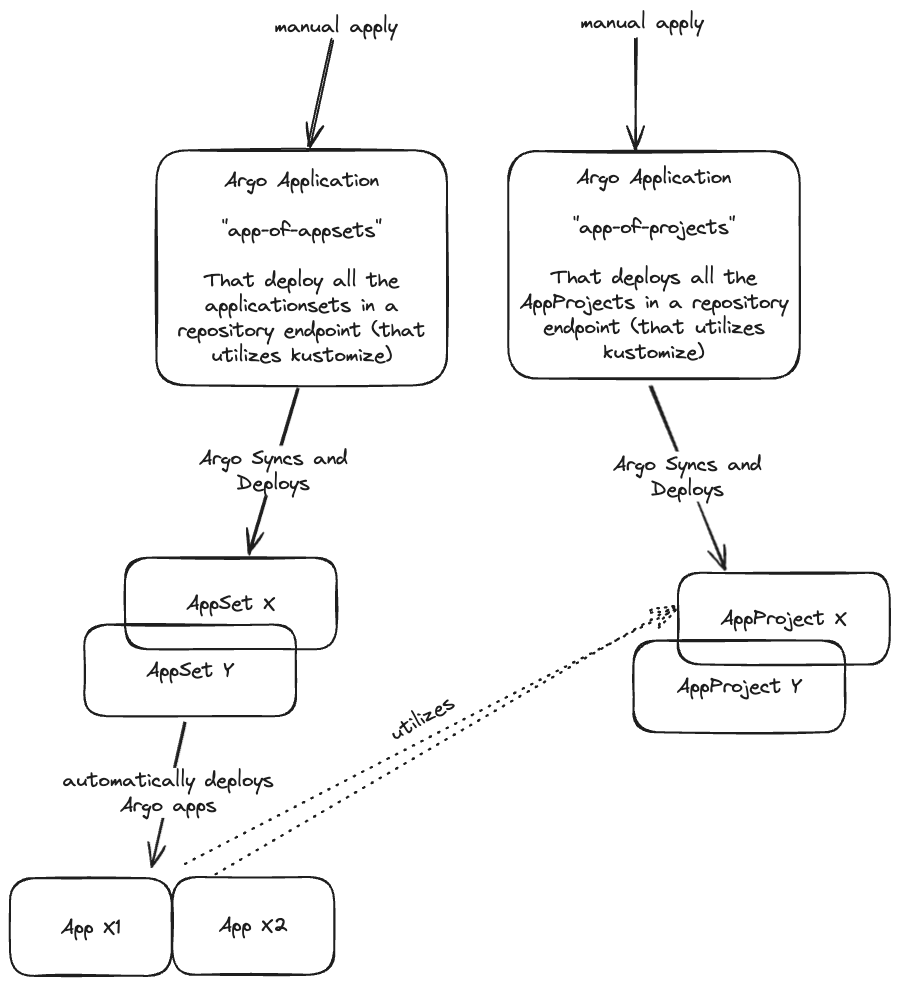
By managing ApplicationSets and AppProjects through Argo CD applications themselves (app-of-appsets and app-of-appprojects) we have automated even the application of these configurations to the cluster. This meta-management layer ensures that all changes are self-maintaining and self-applying, which enhances automation and reduces the need for manual oversight even further.
We utlize the power of the
ApplicationCRD to manage theAppProjects, and theApplicationfactories, theApplicationSets!
Below, I’ll explain our approach more in detail:
We start our setup with a bootstrap operation defined in the
bootstrap.ymlfile, which contains all necessary configurations for initializing Argo CD.At the time of writing this post, it only contains an
AppProjectmanifest (namedmanagement), that we use for the two root YAMLs I will mention below.In order to reconstruct our setup, the only manual steps we need to perform are the following:
- Apply the bootstrap configuration:
kubectl apply -f bootstrap.yml - Set up management for AppProjects and ApplicationSets:
kubectl apply -f app-of-appprojects.yml
kubectl apply -f app-of-appsets.yml
- Apply the bootstrap configuration:
To make changes (add, delete, or edit), simply update the
appprojectsandappsetsdirectories using thekustomizestructure. Each change will be automatically detected by either theapp-of-appprojectsorapp-of-appsetsrespectively.
Diagram: How It’s Working Together
Understanding Our ApplicationSet Approach
Generators: Using
generators, theApplicationSetconstructs a dynamic list of Argo CD applications to be managed. These generators use patterns and parameters defined in configuration files (likeappset_config*.jsonthat you’ll see below) to determine which applications should exist (or be deleted).Scalability: This approach enables the
ApplicationSetto scale efficiently, as it can automatically adjust the number of managed applications based on the repository’s current state. New applications are created, and outdated ones are removed without manual intervention.Considerations:
Any directory that won’t have the
appset_config*.jsonfile or that won’t match its appropriateApplicationSet, will be ignored by theApplicationSet.It’s also important to make sure that no other
ApplicationSetis targeting the same directory, as it may lead to conflicts and unexpected behavior.
Our ApplicationSets Strategies
We have two main strategies for our ApplicationSets:
GitLab Subgroup-based ApplicationSets
ApplicationSets are primarily organized per GitLab subgroup, automatically generating Argo CD Applications for each service or application within the subgroup.
“Orphans”
ApplicationSets (for applications/repos that do not belong to any subgroup) As we have many applications that do not belong to any subgroup, we handle them as “orphans” (both in terms ofApplicationSets and in thegitops-deploymentsrepo).Rationale: We encountered issues when creating an
ApplicationSetthat watches the root hierarchy of the group, as it did not behave as expected. Instead, we decided to separate the “orphans” into a different directory and handle the path logic in the CI using simple bash code. For more details on how we resolved this issue, refer to the Q&A section.
Prod and Non-Prod Environments
The production environments are handled by
ApplicationSets that target directories with aprodprefix in their paths, and non-production environments with anon-prodprefix.Rationale: By using prefixes for
prod*andnon-prod*, we can effectively manage different types of deployments in separateApplicationSets. This approach also ensures that the user only needs to add these prefixes when they want the deployments to be picked up and watched by the correspondingApplicationSetfor deployment.
Examples ApplicationSet Manifests
Real example ApplicationSets config that we use for our own DevOps team (“Octo”):
Infra:
apiVersion: argoproj.io/v1alpha1 kind: ApplicationSet metadata: name: octo-infra-prod namespace: argocd spec: generators: - git: repoURL: [email protected]:octo/gitops-deployments.git revision: main files: - path: deployments/octo/infra/**/envs/prod*/appset_config*.json template: metadata: name: "octo-{{path[3]}}-{{cluster.name}}-{{env}}" finalizers: - resources-finalizer.argocd.argoproj.io namespace: argocd spec: project: octo-infra-prod source: repoURL: [email protected]:octo/gitops-deployments.git targetRevision: main path: "{{path}}" destination: server: "{{cluster.address}}" namespace: "{{namespace}}" syncPolicy: automated: selfHeal: true prune: true syncOptions: - CreateNamespace=trueOrphans:
apiVersion: argoproj.io/v1alpha1
kind: ApplicationSet
metadata:
  name: octo-orphans-prod
  namespace: argocd
spec:
  generators:
    - git:
        repoURL: [email protected]:octo/gitops-deployments.git
        revision: main
        files:
          - path: deployments/octo/orphans/**/envs/prod*/appset_config*.json
  template:
    metadata:
      name: "octo-{{path[3]}}-{{cluster.name}}-{{env}}"
      finalizers:
        - resources-finalizer.argocd.argoproj.io
      namespace: argocd
    spec:
      project: octo-orphans-prod
      source:
        repoURL: [email protected]:octo/gitops-deployments.git
        targetRevision: main
        path: "{{path}}"
      destination:
        server: "{{cluster.address}}"
        namespace: "{{namespace}}"
      syncPolicy:
        automated:
          selfHeal: true
          prune: true
        syncOptions:
          - CreateNamespace=true
These ApplicationSets targets the orphans/infra directory within the octo subgroup in the gitops-deployments repo, focusing on the prod environment.
For more details about the
appset_config*.jsonfiles, refer to the Q&A section.
Scale Strategies with ApplicationSets
Our architecture leverages ApplicationSets to facilitate scalability in the following ways:
Deploying New Services: Adding a new directory in the
gitops-deployments, to apathcrawled by a specificApplicationSetwill make theApplicationSetadd another crawl (thanks to the globbing**in thepath), and so, if the rest of the path is matching the regex/pathin the rest of the path, it will add your new service, including all its environments.Deploying the Same Service to Multiple Clusters: Adding a new JSON configuration file (matching the regex
appset_config*.json) in the relevant envs directory automatically triggers the creation of a new ArgoApplicationtailored to the specific parameters defined within the file.This makes scaling out to additional clusters or deployment environments seamless.
Multi-environment Management (Prod/Non-Prod): By defining separate paths for different environments (like
prod,non-prod-staging,non-prod-sandbox),ApplicationSets can manage deployments across multiple environments efficiently, creating distinct sets of applications for each environment.
Example of Environments (envs) Structure
The envs directory structure plays a crucial role in how ApplicationSets manage deployments:
envs/
├── non-prod-sandbox/
│   ├── appset_config-a.json
│   ├── appset_config-b.json
│   ├── kustomization.yml
├── non-prod-staging/
│   ├── appset_config-c.json
│   ├── kustomization.yml
├── prod/
    ├── appset_config-d.json
    ├── kustomization.yml
Q&A
Q: How did you overcome the difference between the GitLab repositories heirarcy and the
gitops-deploymentsrepo heirarcy?A: we implemented in the CI, a logic that checks if the repository is in the “root” / group level, and then adds to its path in
gitops-deployments, theorphans/directory, so it will hit the right path in the gitops repo.- Snippet from our Gitlab CI’s
before_scriptlogic:if [[ $CI_PROJECT_PATH =~ ^[^/]+/[^/]+$ ]]; then FULL_PROJECT_PATH="$CI_PROJECT_NAMESPACE/orphans/$CI_PROJECT_NAME" else FULL_PROJECT_PATH="$CI_PROJECT_PATH" fi
- Snippet from our Gitlab CI’s
Q: What are the
appset_config*.jsonfiles?A: The
appset_config*.jsonfiles provide additional parameters for theApplicationSet; that way we can combine both the ones we get from thegitgenerator and the ones we define in the JSON file.Example
appset_config.jsonfile:taken from
deployments/sunflower/datamine2/datamine-amoeba-appprd/envs/prod, from thegitops-deploymentsrepoOf course, you can structure your
ApplicationSetand your JSON file in any way that suits your organization’s needs.{ "env": "prod", "cluster": { "name": "dc1-november", "address": "https://10.1.1.1:6443", "dc": "dc1" } }
Q: How do we integrate Helm in our deployment approach?
A: Our deployment approach integrates Helm, allowing us to manage Helm-based and native Kubernetes deployments seamlessly. Key integration points include:
Enabling Helm in Kustomize: We modify the
argocd-cmConfigMap to include the--enable-helmflag in the Kustomize build command.Example Kustomization Config:
apiVersion: kustomize.config.k8s.io/v1beta1
kind: Kustomization
helmCharts:
  - name: devlake
    repo: https://apache.github.io/incubator-devlake-helm-chart
    releaseName: devlake
    namespace: devlake
    version: 1.0.0-beta3
    valuesFile: values.yml
Q: How do we integrate Helm in our deployment approach?
A: Helm deployments work in a similar way to normal applications, where the entrypoint is the environment’s
kustomization.ymlfile. This file should include ahelmChartssection. Key integration points include:This enables flexibility by allowing Helm-based deployments to be patched and to create native K8s resources along the Helm releases.
Enabling Helm in Kustomize: We modify the
argocd-cmConfigMap to include the--enable-helmflag in the Kustomize build command.Example Kustomization Config:
apiVersion: kustomize.config.k8s.io/v1beta1
kind: Kustomization
helmCharts:
  - name: devlake
    repo: https://apache.github.io/incubator-devlake-helm-chart
    releaseName: devlake
    namespace: devlake
    version: 1.0.0-beta3
    valuesFile: values.yml